
You've unboxed your first Meshtastic node, downloaded the app, and you're sitting there looking at a screen that wants to connect to something. The question that stops a lot of people right here is: how does the app on your phone actually talk to a lump of hardware sitting on the table next to you?
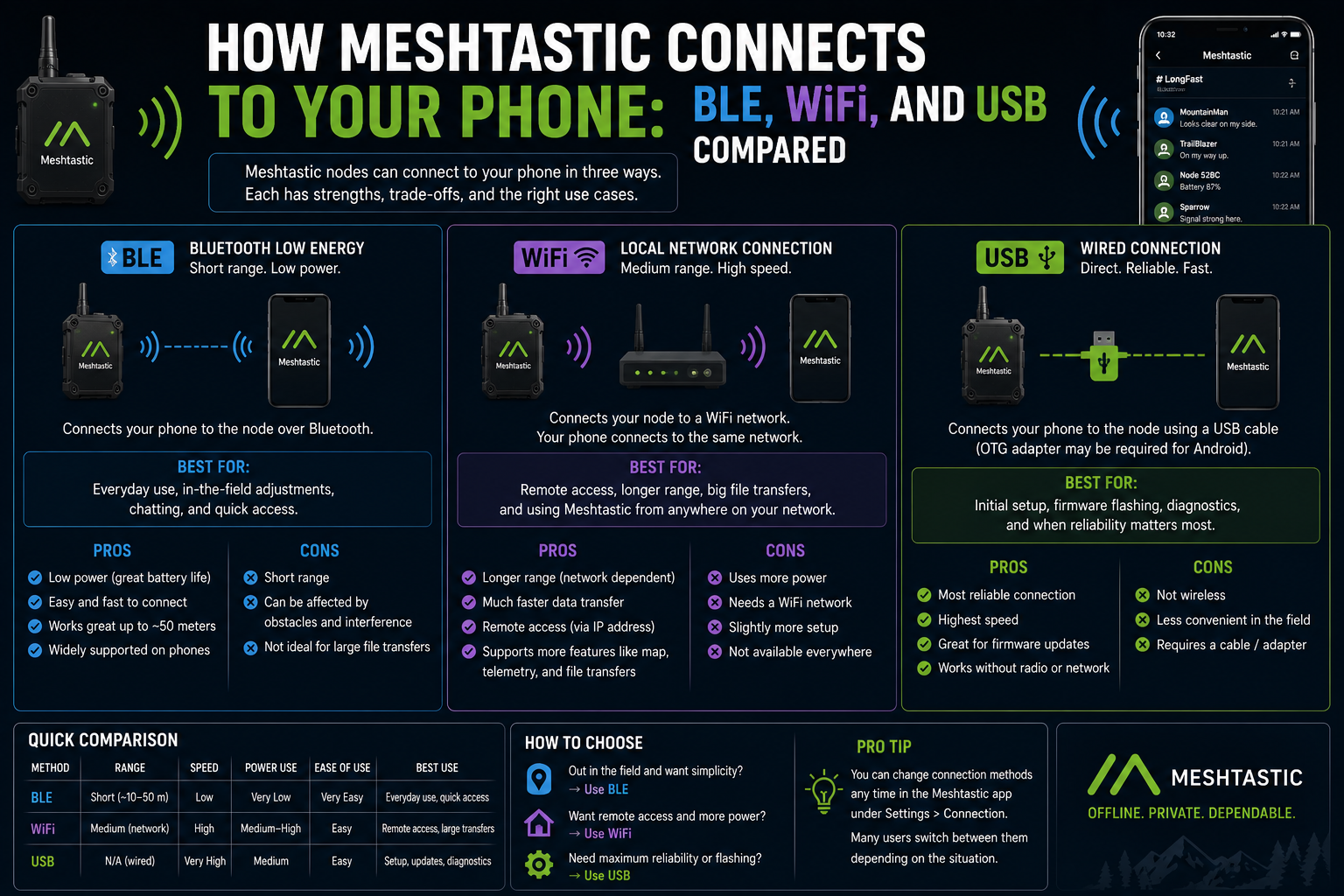
There are three ways a Meshtastic node can connect to your phone or computer: Bluetooth Low Energy, WiFi, and USB. Each one suits a different situation, and knowing which to use, and why, saves you a lot of head-scratching later.
Bluetooth: the default for a reason
For most people, most of the time, Bluetooth Low Energy is how Meshtastic connects to your phone. You open the app, it scans for nearby devices, your node shows up, you tap it, and you're in. That's it.
BLE is built into almost every ESP32-based Meshtastic node, which covers the vast majority of the popular hardware: T-Beam, Heltec V3, Heltec Wireless Tracker, RAK WisBlock with nRF52 chips, the LILYGO T3-S3 family. If the node is battery-powered and you're carrying it with you, BLE is almost certainly how you'll use it.
The range is what you'd expect from any Bluetooth connection. In clear line of sight you might get 10 metres, in a normal indoor environment more like 5 to 7. That's plenty for the job: your node is in your bag, your phone is in your pocket, they stay paired and the app stays connected the whole time you're walking around.
Battery use is minimal. Low Energy lives up to the name. The BLE stack on these nodes is efficient enough that it won't meaningfully shorten your runtime compared to running with BLE disabled.
The one thing worth knowing is that BLE pairing can occasionally be temperamental. If your node stops showing up, power cycling both the node and the app usually fixes it. On some older Android versions, you may need to grant the app location permission before it can scan for Bluetooth devices, which is a strange requirement but a real one.
WiFi: useful when your node has a fixed home
Most ESP32-based nodes also have WiFi hardware, and Meshtastic can use it. Instead of pairing with your phone directly, the node connects to your home WiFi network and becomes accessible at an IP address on your local network.
Once connected over WiFi, the Meshtastic app can reach the node via TCP. You type the node's IP address into the app manually, and from that point it works the same way as BLE, just over your home network instead of a Bluetooth link. Some nodes also serve a basic web interface at that same address, so you can configure and monitor them from any browser without the app at all.
This is genuinely useful for a node that lives in one place. If you've got a node plugged in near a window to extend your mesh, or running as a home base station, WiFi makes it easy to manage without getting out a cable or being in Bluetooth range. Your node is in the loft, you're downstairs, the app connects straight to it.
There's a trade-off. To use WiFi, the node needs to know your network name and password, which means setting that up first, usually via USB or BLE. And if you take the node somewhere without WiFi, the connection method you're relying on disappears. It's a good option for fixed installations, a poor one for portable use.
A few newer nodes support WiFi access point mode, where the node creates its own small network rather than joining yours. This lets you connect a phone or laptop directly without any existing infrastructure, which can be handy in the field for configuration.
USB: the reliable fallback
USB is the connection you reach for when the others aren't working, or when you need to do something more involved than everyday messaging.
Plug a node into a computer via USB and it usually appears as a serial port. The Meshtastic Python command-line tool, the web flasher at flasher.meshtastic.org, and the browser-based client at client.meshtastic.org can all talk to it this way. You can configure the full device settings, send and receive messages, read the device log, and flash firmware updates, all without needing Bluetooth or WiFi to be working at all.
On Android, USB works too, via USB OTG. If your phone supports OTG and you have the right cable, you can plug the node in and the Meshtastic app will detect it as a serial connection. This is niche, but useful if BLE isn't cooperating or you're working through initial setup in a location without WiFi.
USB is also the connection you'll use when something has gone wrong. BLE pairing refusing to work, WiFi credentials set incorrectly, the node stuck in a strange state: USB gets you back in. Because it's a direct wired serial connection, it doesn't depend on any configuration being correct. The node just shows up as a port and you can talk to it.
The obvious limitation is the cable. Not a problem at a desk, a real problem if the node is mounted on a roof or buried in a waterproof case.
Which one should you actually use
For a portable node you're carrying around: BLE. No question. It pairs once, the app reconnects automatically, and it draws almost no extra power.
For a fixed node at home or in your workshop: WiFi makes configuration from anywhere on your network very convenient. Set it up via BLE or USB first, add your WiFi credentials, and then you can leave it plugged in and manage it remotely.
For firmware flashing, initial configuration, or troubleshooting: USB. It is the most reliable and the least dependent on anything else being configured correctly. Every serious Meshtastic user keeps a suitable cable handy for this.
Many people end up using more than one depending on context. A node might pair via BLE for day-to-day use but get configured via USB when a firmware update comes out. That's entirely normal.
A detail that catches people out
The Meshtastic app remembers your last connected device, but it doesn't automatically switch connection methods. If you've been using WiFi and you take your node somewhere without a network, the app will sit there trying to reconnect to an address that no longer responds. You need to manually switch to BLE in the app's connection settings.
It's a small thing, but it's the kind of thing that makes you wonder if the node is broken the first time it happens.
The bigger picture
The connection between your phone and your node is just the last metre of a much longer chain. The mesh itself is doing the interesting work, hopping messages from node to node across kilometres of radio links. But if that last metre doesn't work, none of the rest of it matters.
Getting familiar with all three connection methods means you're never stuck. BLE for convenience, WiFi for fixed nodes, USB when you need certainty. Between them, there's always a way in.